
Reston IT Company on Planning a Phased Windows 10 Upgrade Strategy for Businesses
Reston, United States - January 15, 2026 / AdRem Systems Corporation | Reston, Virginia Managed IT Services Company /

IT Company in Reston Explains How to Reduce Risk During a Windows 10 Upgrade
As of October 14, 2025, Microsoft officially ended support for Windows 10. For businesses still relying on this operating system, the deadline is no longer looming—it’s here. The good news? It’s not too late to make a smooth, secure transition if you take action now.
Whether you’re leading IT, operations, or finance, the key to success lies in strategic planning. Upgrading doesn’t have to mean disruption, downtime, or lost productivity. In fact, with the right partner and approach, your Windows 10 upgrade can be a catalyst for operational improvements.
Lisa Cardenas, VP of Commercial Services with AdRem Systems Corporation identifies, “This isn’t just about an IT upgrade. It’s a strategic business decision. The organizations that act with purpose now will avoid costly detours later.”
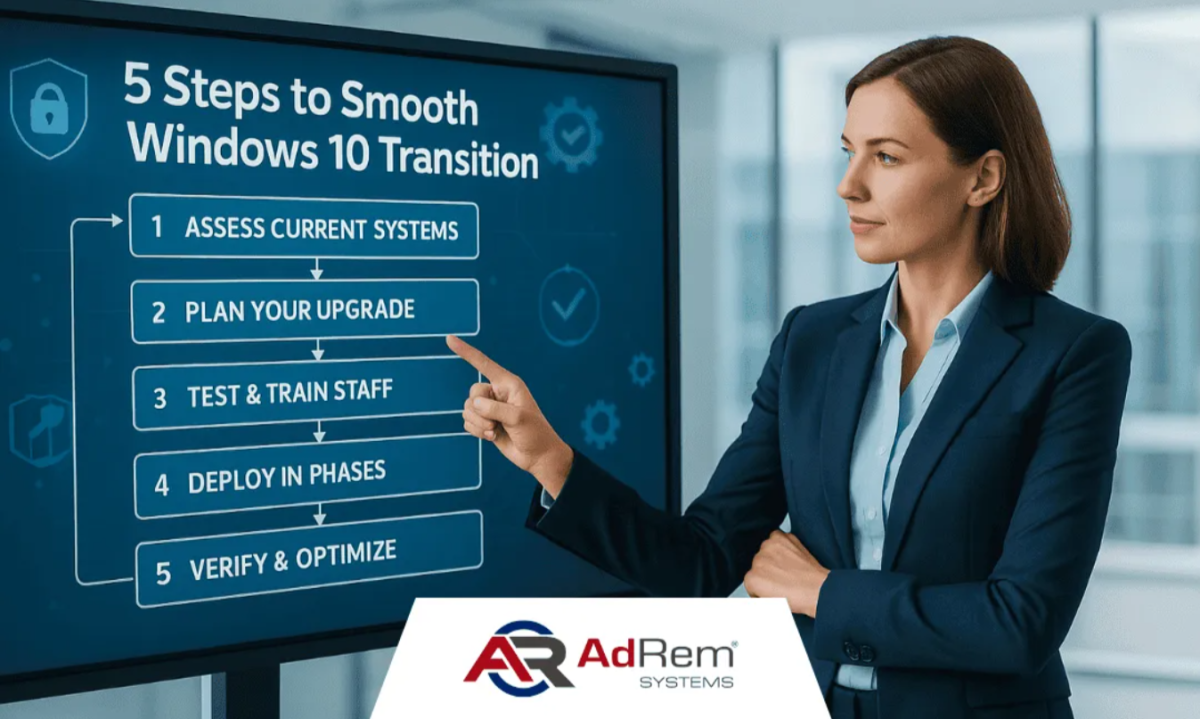
In this article, a reliable Reston IT company outlines the key steps business leaders should follow to reduce risk, maintain continuity, and complete a Windows 10 upgrade without unnecessary disruption.
Step 1: Assess Your Environment
Start with a full inventory of every system still running Windows 10. Include desktops, laptops, POS terminals, kiosks, and even remote employee devices. Pay special attention to mission-critical systems and aging hardware that may not be upgrade-compatible.
Identify any applications or services with software dependencies tied to Windows 10. Are there licenses that need updating? Will peripherals (like printers or scanners) still function?
A simple assessment checklist can save hours later. It also gives your IT team or MSP a foundation to recommend the best path forward.
What Ends with Windows 10 Support?
- Security patches
- Microsoft support
- Compatibility with new software
- Regulatory compliance
Step 2: Evaluate Upgrade Paths
Not every device needs to be replaced overnight. Evaluate your upgrade options:
- Upgrade in place to Windows 11 (for compatible hardware)
- Replace hardware where needed (especially aging systems)
- Explore virtualization for specific use cases or legacy needs
Take stock of licensing implications, compatibility checks, and rollout timelines. Prioritize systems based on business role and security risk.
Step 3: Prioritize Security and Compliance
Every unsupported system left online is a potential security threat. That alone makes this transition a cybersecurity priority.
Beyond system upgrades, now is the time to evaluate:
- Multi-factor authentication (MFA) usage
- Endpoint protection and antivirus coverage
- Patch management policies
For regulated industries, document every step. Compliance with HIPAA, CMMC, or PCI often requires clear traceability during migrations.
“A secure migration is about anticipating and mitigating risks before they disrupt your business and ensuring your organization remains resilient and compliant,” adds Patrick Birt, CEO and owner of AdRem.
Step 4: Create a Phased Rollout Plan
Attempting a full upgrade in one swoop can create chaos. Instead, plan a phased rollout based on:
- Department priorities
- Workflow dependencies
- Security risk levels
Start with a pilot group. Validate upgrade processes and resolve any unexpected issues before a broader rollout.
Schedule during low-impact business windows (after hours or between major projects), and keep employees informed with clear communication and training.
Pilot Program Tip: Begin with a small, tech-savvy team who can provide feedback on the rollout process. Their insights can prevent company-wide friction.
Step 5: Partner for a Worry-Free Migration
You don’t have to go it alone. Working with a managed IT partner saves time, reduces stress, and ensures your upgrade is handled with precision.
With over 21 years of experience and industry-leading satisfaction ratings, AdRem helps businesses manage migrations with:
- Fast response times (1.2 min avg)
- 99% customer satisfaction
- Options for fully managed or co-managed support
A good partner will not only plan and execute your upgrade but also provide proactive maintenance and security moving forward.
Before & After IT Readiness Comparison:
| Area | Before Upgrade | After Upgrade |
| Security | Unpatched OS | Fully updated + Monitored |
| Productivity | Disrupted by crashes | Stable and optimized |
| Compliance | At risk | Audit-ready |
Still on Windows 10? Take Action with a Trusted IT Firm in Reston
Windows 10 is no longer supported, but your business doesn’t have to be caught off guard. A strategic, phased upgrade is still within reach.
Transition smoothly and securely with AdRem Systems Corporation. Let’s make your next move the right one for security, compliance, and business continuity.
Contact a trusted IT firm in Reston to start your Windows 10 upgrade plan with confidence. Whether you’re ready to move forward now or need time to evaluate your options, the right guidance can help you reduce risk and maintain business continuity during the transition.
Contact Information:
AdRem Systems Corporation | Reston, Virginia Managed IT Services Company
1801 Robert Fulton Drive,, Suite 270
Reston, VA 20191
United States
Ashley Birt
(571) 489-4140
https://www.adrem.com/


Original Source: https://www.adrem.com/windows-10-smooth-upgrade-steps/
